Cut Text and Graphics Out of Any PDF File
Extracting a picture or a paragraph from a PDF file can be a pain, especially if you do not have Adobe Acrobat or other extraction and conversion tools installed in your device. The hassle of screen-grabbing the file and copying it on your photo editing tool can take ages and can lower the quality of your extracted file. Luckily, there are now third-party snipping tools that are available for download. PDF Snipping Tool is one of those. This utility application offers an easy and faster way of cutting out specific parts of a PDF file.
Top Recommended Alternative

Snip Virtually Any Content
PDF is often the preferred format in saving text documents for their advanced security option. However, PDF files are not the easiest to process. More so, it is very difficult to extract a specific area in this file format. Here enters PDF Snipping Tool.
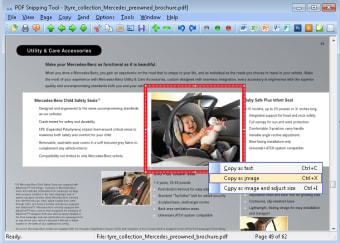
PDF Snipping Tool lets you capture text and images from any PDF file. You can either choose to take snips from rectangular areas or even the entire page. Your snips can then either be cut and pasted into other programs. You can send it to professional image editors, such as Adobe Photoshop, Illustrator, and CorelDraw. PDF Snipping Tool is also integrated to Microsoft Office suite, so you can also send extracted parts to Word, Excel, and PowerPoint.
You can also save captured parts as image files. PDF Snipping Tool supports popular image formats, including JPG, PNG, BMP, TIFF, and GIF. Extracted files can also be saved as a web page or a plain text file. Furthermore, users can also send extracted files through e-mail.
PDF Snipping File can virtually snip any part of a PDF file, whether text or image. You can even enlarge or shrink the snipped area to your liking.
Easy App Usage
In addition to letting you snip anything out of any PDF file, what would users love about the PDF Snipping Tool app is its easy usage. The app looks like a typical PDF file with option buttons on the taskbar making it easy for you to choose the action that you want to do.
To open an existing PDF file on the app, simply open the document on the File tab and choose your desired file. Once you have the document opened, you can select the area that you want to extract. Just like in Windows’ Paint tool, the selected area would be encased in a rectangular frame. From the taskbar, you can choose whether to copy the selected area and send it to another Window or via e-mail. You can also choose to copy the selected area to other programs.
In Conclusion
Simply put, PDF Snipping Tool manages to live up to expectations. It provides users with a neat set of functions making it easier to grab texts and images from any PDF document. Its other functions such as the ability to save files as an image, text or web page, and allowing you to send extracted files to other processing applications are a major plus as it provides another level of convenience. If you are always working with PDF files, this application needs to be installed in your device.